
myVCA
VCA, Inc.Medical
4.81.40K Reviews
- Version
- 5.11.356
- Installs
- 500.00K
- Age Rating
- Everyone
Screenshots

Our Review of myVCA
 Analysis by Appyee
Managing a pet’s health usually means juggling vaccination reminders, clinic phone numbers, medication questions, and a growing pile of records. After spending time with myVCA, I see it as a practical companion for people who already use VCA veterinary care and want those details gathered in one place. It is a free medical app from VCA, Inc., aimed at helping owners stay organized rather than replacing a veterinarian.
That distinction matters. This is not an emergency diagnosis tool, and it is not a universal pet encyclopedia. Its value comes from connecting everyday pet-care routines with a VCA relationship. When that connection fits your situation, the app can reduce small bits of friction that otherwise lead to missed reminders or last-minute searching. When it does not, much of its appeal becomes less relevant.
How myVCA fits into everyday pet care
The first thing I noticed is that the app makes more sense as a continuing-care dashboard than as a one-time download. A new puppy or kitten owner, for example, may need to keep track of appointments, preventive care, and follow-up questions over several months. Having a familiar place to return to is more useful than keeping every detail in text messages, paper folders, and a general calendar.
I also like that the app is focused on the owner’s relationship with veterinary care. That focus keeps it more practical than broad pet-health apps that try to cover everything from training to nutrition to symptom searches. The trade-off is that myVCA feels narrower. Its usefulness depends on whether VCA is part of your pet’s care routine, so it is not the obvious choice for someone looking for an independent tool that works equally well with any clinic.
The app has been available since April 18, 2017, and its current version is 5.11.356. It supports Android devices running version 7.0 or later, which makes it accessible to many owners using older phones. It is rated for Everyone, so there is no age-related barrier for a household that wants to use it together. Those details are less important than the workflow itself, but they do make the app approachable for ordinary family use.
A useful home base for appointments and records
For me, the strongest reason to keep an app like this installed is not that it performs one spectacular task. It is that it can become the first place I check when I need a pet-care detail. Instead of remembering which email contains a reminder or which paper shows a previous visit, I can begin with the app and then contact the clinic when a professional answer is needed.
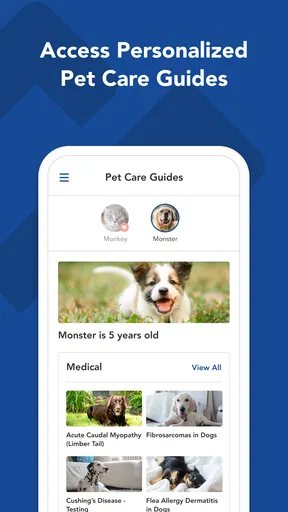
This is especially helpful in a multi-pet household. Cats and dogs often have different schedules, different medications, and different care histories. Mixing those details is an easy mistake when everything is stored in a shared calendar. A pet-focused account structure can make it easier to think in terms of the individual animal rather than treating the household as one record.
My practical tip is to use the app immediately after a visit, while the information is still fresh. I would check the pet profile, review any next steps, and make a separate note of questions that need clarification. That habit is more reliable than waiting until the next appointment, when small details such as when a treatment began may already be fuzzy.
Where it helps during a normal week
Imagine leaving work and noticing that your dog is due for a routine visit soon. You may not remember the clinic’s opening hours, the date of the last appointment, or whether a follow-up was suggested. An app like myVCA gives you a single starting point instead of forcing you to search through several unrelated tools. Even if you still need to call the hospital, the preparation is quicker because the relevant context is close at hand.
Another realistic situation is a family member taking the pet to the clinic. If one person usually handles veterinary appointments, the others may not know what was discussed. A shared, organized care reference can make handoffs less awkward. I would still confirm important instructions directly with the veterinary team, but the app can help prevent basic information from being lost between household members.
Travel is another moment when organization matters. A pet owner may need to think about recent care, upcoming appointments, or questions for a new clinic. myVCA is more useful here as a record-access and preparation aid than as a substitute for checking destination requirements or speaking with a veterinarian. I would not rely on any app alone for time-sensitive travel rules or urgent medical decisions.
The most important limitation: it is tied to a care network
The central weakness is also the app’s defining characteristic. myVCA is built around VCA, Inc., so owners who use an independent practice may find that a general calendar, a notes app, or their clinic’s own system fits better. Downloading it simply because it is free does not guarantee that it will become useful. The app earns its place when it matches the way your veterinary care is already organized.
That dependence can also affect households that move frequently or use more than one veterinary provider. One clinic may handle routine care while another manages a specialist visit. In that situation, myVCA may still be helpful for the VCA portion of the relationship, but it should not be treated as the complete medical record unless you have personally checked that all the information you need is available there.
I would also avoid treating a convenient digital record as proof that every detail is current. Pet health changes, prescriptions can change, and instructions can be misunderstood. The sensible workflow is to use the app to prepare and remember, then ask the clinic when something affects treatment. Convenience is valuable, but it should support veterinary judgment rather than replace it.
What it does better than ordinary alternatives
A standard calendar is excellent for a date, but it has little context. It may remind me that an appointment exists without helping me connect that event to the right pet, the clinic relationship, or the questions I want to ask. A notes app is flexible, but flexibility can become clutter when several animals and multiple visits are involved. myVCA’s advantage is that it is designed around pet care instead of forcing owners to build that structure themselves.
On the other hand, general tools are more portable. A calendar remains useful if I change clinics, and a notes app can store information from any veterinarian. That makes them better as a complete household backup. My preferred approach would be to use myVCA for VCA-related organization while keeping critical instructions and urgent contact details accessible elsewhere. That small amount of redundancy is worthwhile when health information is involved.
Compared with symptom-search apps, myVCA also takes a less alarming approach. Searching the internet late at night can produce a long list of frightening possibilities, many of which do not apply to the individual animal. A clinic-connected app encourages a more grounded next step: review what is known, identify the question, and contact the veterinary team. It is not a diagnostic engine, and I consider that a strength rather than a missing feature.
Small habits that make the app more useful
The best results come from treating the app as part of a routine. After installing it, I would first make sure the correct pet information and clinic relationship are represented. If the household has more than one animal, I would slow down during setup and check names carefully before relying on reminders. A small identification mistake can create confusion later, especially when two pets have appointments close together.
I would also use appointments as prompts for preparation, not just as calendar entries. Before a visit, I might write down changes in appetite, energy, sleep, or behavior in a separate note and bring those observations into the conversation. The app can help me remember the appointment, but the quality of the visit still depends on the information I provide.
A third useful habit is reviewing information after a visit rather than assuming that remembering the conversation will be enough. Pet owners often hear several instructions at once. Checking the available details later can expose questions while the clinic can still answer them clearly. If anything seems inconsistent, I would call instead of guessing.
These workflows reveal a subtle trade-off: myVCA is most valuable to organized owners who actually return to it. Installing it and never checking it will not improve care. The app can reduce administrative friction, but it cannot create a routine on its own.
Who should use it and who should skip it
I would recommend myVCA first to owners whose pets are treated through VCA and who want a more convenient way to stay connected with that care. It is also a sensible option for people who dislike paper records, regularly forget appointment details, or share pet responsibilities with another family member. New pet owners may appreciate having a dedicated place to build a care routine instead of improvising with unrelated apps.
It may be less suitable for someone who wants a completely independent record system across several clinics. Owners who prefer a simple printed folder may also see little benefit, particularly if they already have a reliable method for reminders and contact information. Likewise, anyone expecting an app to diagnose symptoms, make emergency decisions, or replace a phone call to a veterinarian should choose a different kind of resource—or, more appropriately, contact a professional directly.
The app’s broad reach is encouraging: it has passed 500 thousand installs and holds a 4.8 average from about 8.7 thousand ratings. Those figures suggest that many owners find the approach worthwhile, but they do not change the main question I would ask before installing it: do I use VCA for my pet’s care, and will I actually use a digital care hub?
My final view after using it
myVCA is a focused, sensible medical app rather than an all-purpose pet assistant. I like its emphasis on keeping veterinary care easier to follow, and I think its greatest strength is the way it can turn scattered appointment-related tasks into a repeatable routine. The free price removes the risk of trying it, while the Everyone rating makes it comfortable for shared household use.
Still, I would not recommend it universally. Its connection to VCA is a meaningful boundary, not a minor footnote, and owners who need a clinic-neutral archive may be better served by a calendar, notes system, or another general pet-record solution. Even VCA clients should keep direct communication with their veterinary team at the center of important decisions.
My verdict is straightforward: myVCA is worth installing when VCA is already part of your pet’s healthcare and you want practical organization in your pocket. It is less compelling as a standalone pet-health app, but within the right care relationship it can become a useful everyday checkpoint—one that helps me remember, prepare, and follow up without pretending to be the veterinarian.
With around 1.4 thousand written reviews and more than 500 thousand installs, the app has established a visible place among pet-care tools. I would judge it by fit rather than popularity. If your clinic relationship matches its purpose, the current version offers a straightforward way to support a healthier, more manageable routine for your pet.
A few practical checks before you rely on it
Before making this your main reference, I would test the everyday tasks that matter to my household rather than assuming a care app will fit automatically. Check that you can identify the right pet and clinic, find the information you expect to consult, and understand how you would get help when an entry is unclear. This quick trial is especially worthwhile if another person in the family will also be responsible for appointments.
I would keep a simple backup for details that matter when the phone is unavailable or a clinic visit is being handled by someone who does not use the app. That need not mean maintaining two elaborate systems. A current emergency contact saved in the phone and a brief note of essential instructions can be enough to avoid depending on one digital destination for every situation.
Choosing the right tool for your situation
The choice is not necessarily between myVCA and every other way of organizing care. For a VCA client, it can serve as the clinic-oriented starting point, while a regular calendar handles household scheduling and a paper or digital backup holds information that needs to travel across providers. For an owner whose care is split between several unrelated practices, a clinic-neutral record system may be the better foundation, with the VCA app used only where it adds value.
I would also separate ordinary organization from urgent triage. If I am trying to remember a routine follow-up, a dedicated care hub may help me get oriented. If an animal seems seriously unwell, searching through records or comparing app options is the wrong first step; I would contact a veterinarian or emergency service. That boundary makes the app easier to evaluate fairly: useful for continuity and preparation, not a substitute for timely professional care.
That is why my recommendation depends less on how many tools an owner already has and more on whether the VCA connection reduces real effort. If it saves repeated searching, helps household members stay on the same page, or gives a new owner a consistent place to begin, it has a clear role. If it merely duplicates a system that already works, there is no need to force another app into the routine.
Verdict
Strengths of myVCA
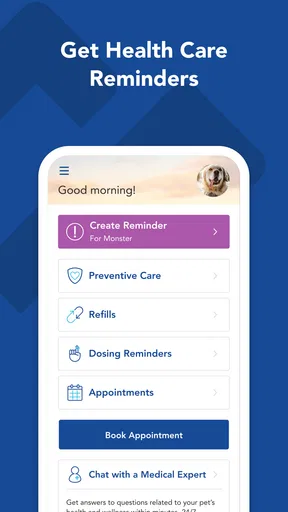
- Easy access to pet health records, prescriptions, and vaccination history.
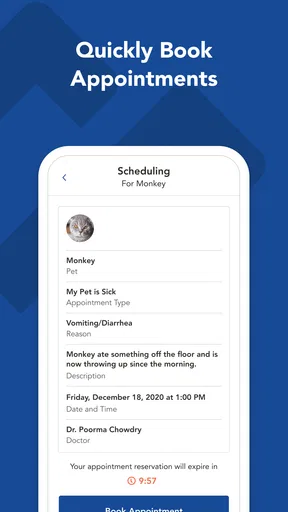
- Appointment scheduling makes booking VCA clinic visits more convenient.
- Prescription refill requests can be submitted directly from the app.
- Useful reminders help owners keep up with medications and pet care tasks.
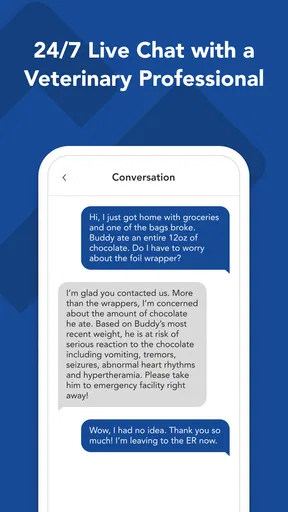
- Supports communication with participating VCA veterinary hospitals.
Limitations of myVCA
- Features may vary depending on the services offered by your local VCA hospital.
- Requires a VCA account and clinic connection before many tools become available.
- Some users may experience delays in appointment or refill confirmations.
- The app is less useful for pet owners who do not visit VCA hospitals.
- Emergency care guidance cannot replace immediate contact with a veterinarian.
Similar Picks in This Category
View All
WebMD: Symptom Checker
WebMD, LLC4.1

Microphone Amplifier
DOSA Apps4.2

Anatomy Learning - 3D Anatomy
3D Medical OU4.5

Period Tracker and Calendar
SimpleInnovation4.9

GoodRx: Prescription Coupons
GoodRx4.8

CVS Health
CVS Pharmacy4.5
Frequently Asked Questions
What is myVCA and what can I use it for?
myVCA is a mobile app for VCA Animal Hospitals clients that helps manage their pets’ veterinary care. After signing in, you can typically view pet health information, review appointment details, request or schedule visits, contact a VCA hospital, access reminders, and manage information for multiple pets. Available tools may vary depending on your hospital, account, location, and the services offered by VCA.
Can I schedule veterinary appointments through myVCA?
In many cases, myVCA lets you request or manage appointments with a participating VCA Animal Hospital. You may be able to choose a pet, select a preferred hospital, review available appointment options, and receive confirmation or follow-up communication. The app should not be considered a replacement for urgent veterinary care, and appointment features can differ by hospital, so contacting the clinic directly may still be necessary.
Does myVCA provide access to my pet’s medical records and prescriptions?
The app may provide access to selected pet health information, such as visit history, vaccination details, treatment notes, prescriptions, or care instructions, depending on what your VCA hospital has made available digitally. Records may not appear immediately after a visit, and some information could be incomplete or restricted. For clarification about a diagnosis, medication, or missing record, contact your veterinary team directly.
Is myVCA useful for managing more than one pet?
Yes, myVCA is designed to support households with multiple pets, allowing you to associate several animal profiles with one client account when the records are correctly linked by the hospital. You can usually switch between pets to review appointments, reminders, and health information. If a pet is missing or appears under the wrong profile, you should ask your VCA hospital to update or connect the records.
Is myVCA free, and what should I do if I cannot log in?
Downloading and using myVCA may not require a separate app subscription, although veterinary appointments, treatments, medications, and other hospital services can involve charges. To sign in, you generally need the email address associated with your VCA account and the required password or verification details. If you forget your credentials, cannot verify your account, or encounter technical problems, use the app’s recovery options or contact VCA support or your local hospital.
